Implementing Password Checker with Flutter Hooks
Posted August 6, 2023

Flutter hooks provide a robust and simple approach to managing Widget life-cycle management. It makes reusing code logic extremely simple. They exist for a single purpose: to reduce code duplication across widgets by deleting duplicates.
In this article, you will learn how to work with Flutter hooks and also implement a complete password checker user interface using Flutter hooks.
Prerequisites
- Install AndroidStudio on your system
- Download and install Flutter and set it up as described here.
To start the tutorial, run the following command to create a new Flutter project.
flutter create password_checker
Open the main.dart file and replace the content with the following;
void main() {
  runApp(PasswordCheckerApp());
}

class PasswordCheckerApp extends StatelessWidget {
  @override
  Widget build(BuildContext context) {
    return MaterialApp(
      debugShowCheckedModeBanner: false,
      title: 'Password Checker',
      theme: ThemeData(
        primaryColor: Color(0xffFC7E15),
      ),
      home: ChangePasswordPage(),
    );
  }
}
Create a Validation mixin
We will use a validation mixin to hold the logic to validate the user’s input. Create a file called input_validation_mixin.dart with the following code.
mixin InputValidatorMixin {
  bool isPasswordValid(String password) {
    if (password.trim().isEmpty) return false;

    return RegExp(
            r"(?=.*[a-z])(?=.*[A-Z])(?=.*[0-9])(?=.*[^A-Za-z0-9])(?=.{8,})")
        .hasMatch(password);
  }

  bool isPasswordValidRelax(String password) => password.trim().isNotEmpty;

  bool hasOneUppercase(String text) {
    if (text.trim().isEmpty) return false;

    return RegExp(r'(?=.*[A-Z])').hasMatch(text);
  }

  bool hasOneLowercase(String text) {
    if (text.trim().isEmpty) return false;

    return RegExp(r'(?=.*[a-z])').hasMatch(text);
  }

  bool hasOneSymbol(String text) {
    if (text.trim().isEmpty) return false;

    return RegExp(
            r'^(?=.*?[)(\][)(|:};{?.="\u0027%!+<@>#\$/&*~^_-`,\u005C\u002D])')
        .hasMatch(text);
  }

  bool hasAtLeast8cha(String text) {
    if (text.trim().isEmpty)
      return false;
    else
      return text.length > 7;
  }

  bool hasOneDigit(String text) {
    if (text.trim().isEmpty) return false;

    return RegExp(r'^(?=.*?[0-9])').hasMatch(text);
  }
}
Creating a Custom Password Field
For the application, we would have a custom password field that handles some logic that is contained within the field.
The password field would extend from HookWidget and use the useState hook to manipulate password visibility, as shown in the code below;
class PasswordField extends HookWidget {
  final ValueChanged<String> onChanged;

  final String hintText;

  final String labelText;

  final FocusNode focusNode;

  final VoidCallback onEditComplete;

  final FormFieldValidator<String> validator;

  final TextEditingController controller;

  final TextInputAction textInputAction;

  const PasswordField({
    Key key,
    this.onChanged,
    this.hintText = "Choose a new password",
    this.labelText = "Enter password",
    this.focusNode,
    this.onEditComplete,
    this.controller,
    this.textInputAction = TextInputAction.done,
    this.validator,
  }) : super(key: key);

  @override
  Widget build(BuildContext context) {
    final showPassword = useState(false);

    void _toggleShowPassword() => showPassword.value = !showPassword.value;

    return TextFormField(
      controller: controller,
      obscureText: !showPassword.value,
      onChanged: onChanged,
      focusNode: focusNode,
      validator: validator,
      onEditingComplete: onEditComplete,
      textInputAction: textInputAction,
      decoration: InputDecoration(
          hintText: hintText,
          labelText: labelText,
          border: OutlineInputBorder(
              borderSide: BorderSide(color: Color(0xffEBEBEB))),
          enabledBorder: OutlineInputBorder(
              borderSide: BorderSide(color: Color(0xffEBEBEB))),
          focusedBorder: OutlineInputBorder(
              borderSide: BorderSide(color: Color(0xffFC7E15))),
          suffixIcon: IconButton(
            icon:
                Icon(showPassword.value ? Icons.lock_open : Icons.lock_outline),
            onPressed: _toggleShowPassword,
          )),
    );
  }
}
Creating the Password Checker Widget
The password checker widget Is the widget that indicates if the password criteria are met or not; it has all the conditions laid out and checks the ones that have passed.
The password checker widget extends from HookWidget and only accepts a TextEditingController.
Create a file called password_checker_widget.dart and add the following lines of code.
class PasswordChecker extends HookWidget with InputValidatorMixin {
  final TextEditingController textEditingController;

  PasswordChecker({Key key, @required this.textEditingController})
      : super(key: key);

  @override
  Widget build(BuildContext context) {
    final hasUpperCase = useState(false);

    final hasLowerCase = useState(false);

    final hasSymbol = useState(false);

    final has8cha = useState(false);

    final has1No = useState(false);

    void _textListener() {
      if (hasOneUppercase(textEditingController.text)) {
        hasUpperCase.value = true;
      } else {
        hasUpperCase.value = false;
      }

      if (hasOneLowercase(textEditingController.text)) {
        hasLowerCase.value = true;
      } else {
        hasLowerCase.value = false;
      }

      if (hasOneSymbol(textEditingController.text)) {
        hasSymbol.value = true;
      } else {
        hasSymbol.value = false;
      }

      if (hasAtLeast8cha(textEditingController.text)) {
        has8cha.value = true;
      } else {
        has8cha.value = false;
      }

      if (hasOneDigit(textEditingController.text)) {
        has1No.value = true;
      } else {
        has1No.value = false;
      }
    }

    useEffect(() {
      textEditingController.addListener(_textListener);

      return () => textEditingController.removeListener(_textListener);
    });

    return Column(
      children: [
        _CheckField(
          isChecked: hasUpperCase.value,
          title: 'Uppercase characters are required in the password.',
        ),
        _CheckField(
          isChecked: hasLowerCase.value,
          title: 'Password must include lowercase',
        ),
        _CheckField(
          isChecked: hasSymbol.value,
          title: 'Password must include a special character',
        ),
        _CheckField(
          isChecked: has8cha.value,
          title: 'The password must be at least eight characters long.',
        ),
        _CheckField(
          isChecked: has1No.value,
          title: 'Password must include a digit',
        ),
      ],
    );
  }
}

class _CheckField extends StatelessWidget {
  final String title;

  final bool isChecked;

  const _CheckField({Key key, this.title, this.isChecked}) : super(key: key);

  @override
  Widget build(BuildContext context) {
    return Padding(
      padding: const EdgeInsets.only(bottom: 16),
      child: Row(
        children: [
          if (isChecked)
            Icon(
              Icons.check_circle,
              color: Colors.green,
            )
          else
            Icon(
              Icons.cancel,
              color: Colors.red,
            ),
          const SizedBox(width: 10),
          Text(
            "$title",
          )
        ],
      ),
    );
  }
}
Create the Change Password Page
Finally, we need to create the change password page that shows the current password and the new password field and re-type the password field.
Create a new file called change_password_page.dart, and add the following code.
class ChangePasswordPage extends HookWidget with InputValidatorMixin {
  final _formKey = GlobalKey<FormState>();

  @override
  Widget build(BuildContext context) {
    final currentNode = useFocusNode();

    final newNode = useFocusNode();

    final retypeNode = useFocusNode();

    final currentPassword = useTextEditingController();

    final newPassword = useTextEditingController();

    return Scaffold(
      appBar: AppBar(
        title: const Text('Change Password'),
      ),
      body: SingleChildScrollView(
        child: Padding(
          padding: const EdgeInsets.symmetric(horizontal: 16),
          child: Form(
            key: _formKey,
            child: Column(
              children: [
                const SizedBox(height: 30),
                PasswordField(
                  controller: currentPassword,
                  focusNode: currentNode,
                  labelText: "Current password",
                  hintText: "",
                  validator: (password) => isPasswordValidRelax(password)
                      ? null
                      : 'Enter a valid password',
                  textInputAction: TextInputAction.next,
                  onEditComplete: () {
                    newNode.requestFocus();
                  },
                ),
                const SizedBox(height: 30),
                PasswordField(
                  controller: newPassword,
                  focusNode: newNode,
                  labelText: "Choose new password",
                  hintText: "",
                  textInputAction: TextInputAction.next,
                  validator: (password) => isPasswordValid(password)
                      ? null
                      : 'Choose a strong password',
                  onEditComplete: () {
                    retypeNode.requestFocus();
                  },
                ),
                const SizedBox(height: 16),
                PasswordChecker(
                  textEditingController: newPassword,
                ),
                const SizedBox(height: 10),
                PasswordField(
                  focusNode: retypeNode,
                  hintText: "",
                  labelText: "Re-type new password",
                  validator: (password) {
                    if (password == newPassword.text) {
                      return null;
                    } else {
                      return 'Password does not match';
                    }
                  },
                  onEditComplete: () {
                    retypeNode.unfocus();
                  },
                ),
                const SizedBox(height: 30),
                ElevatedButton(
                    style: ElevatedButton.styleFrom(
                      minimumSize: const Size(double.maxFinite, 40),
                      elevation: 0,
                      primary: Color(0xffFC7E15),
                      shape: RoundedRectangleBorder(
                          borderRadius: BorderRadius.circular(8)),
                    ),
                    onPressed: () {
                      if (_formKey.currentState.validate()) {
                        // Perform your logic
                      }
                    },
                    child: Text('Change Password'))
              ],
            ),
          ),
        ),
      ),
    );
  }
}
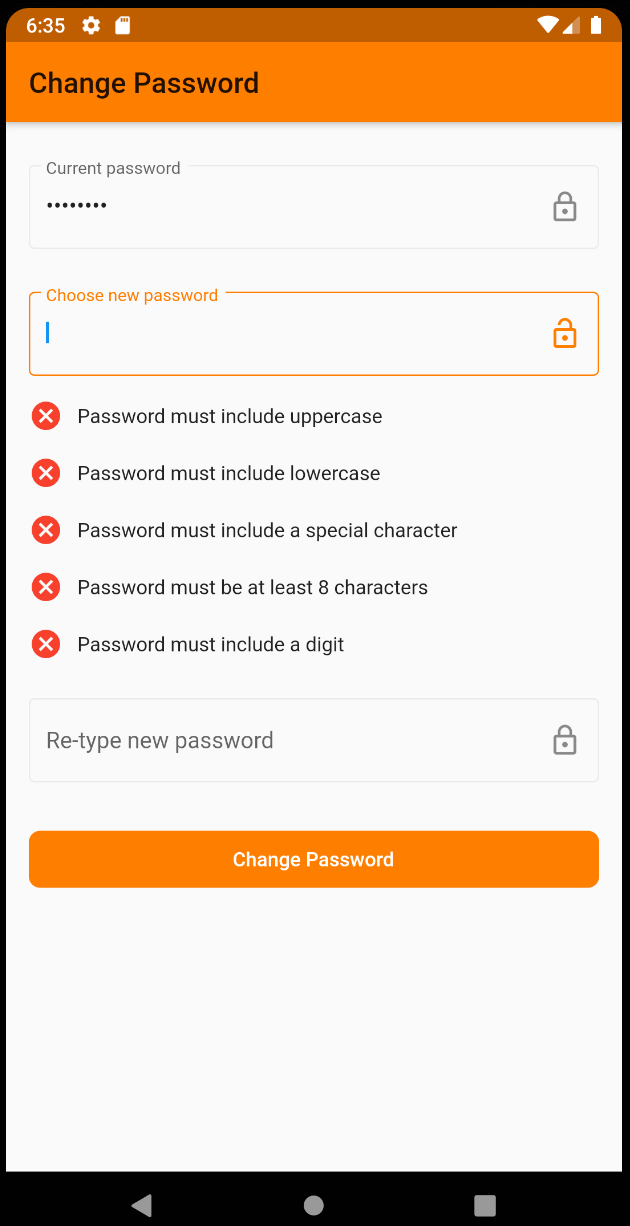
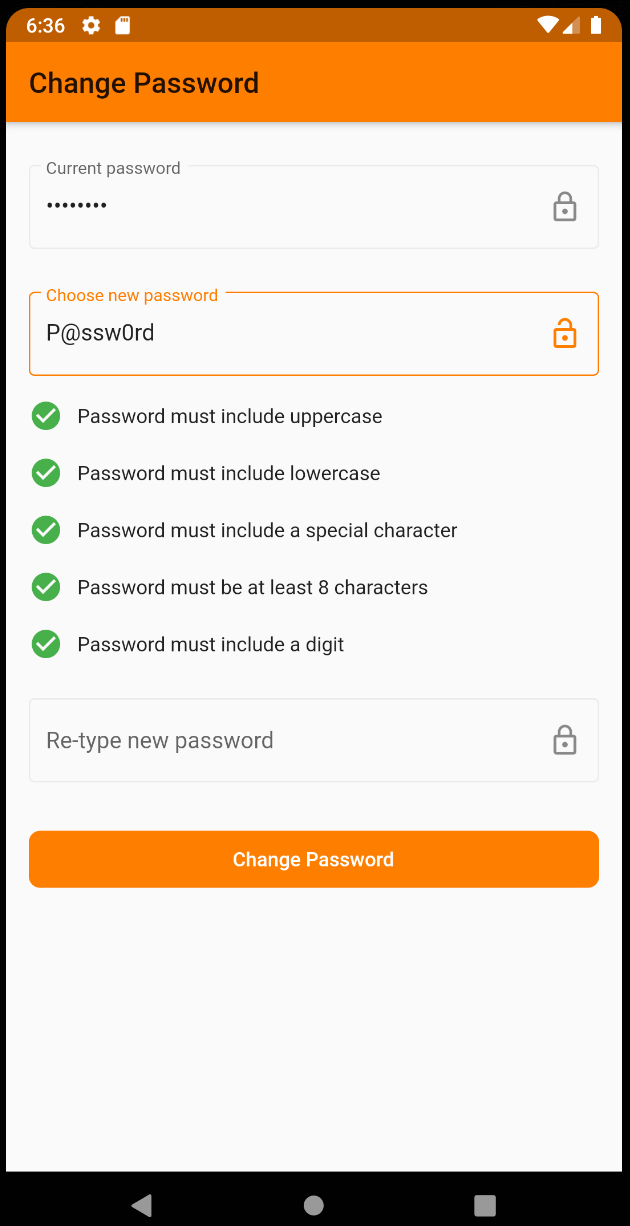
Here is your final Password Checker with Flutter Hooks:
- If you have the wrong Password parameters, the checker will detect them as follows:
- In case you have all parameters correct, here is how Flutter will execute the password checker:
Conclusion
This guide taught you how to create and implement a Flutter Password Checker with Flutter Hooks.
I hope you found this helpful!