Guide to Terraform Functions for Infrastructure Automation - With Examples and Best Practices
Posted July 25, 2023

In this article, you’ll learn all about Terraform functions, with examples and best practices, to help you learn how they can be implemented. Buckle up and get ready to boost your Infrastructure Workflow like a pro.
Introduction
Automating infrastructure involves creating a plan that outlines the desired state of your infrastructure. This plan is then implemented using strategies such as infrastructure as code (IaC).
IaC enables DevOps teams to automatically configure deployments, provision resources, and manage underlying IT infrastructure. By utilizing code to spin up infrastructure, IaC eliminates the need for manual deployment configurations. Instead, to achieve this automation, you can create configuration files that describe your infrastructure blueprint and specifications.
Terraform, an IaC tool, has become a popular choice among developers to automate various tasks and help simplify their workload using code. The Terraform workflow uses three core stages:
- Write your resources
- Create an execution plan
- Apply proposed resources to your infrastructure
In addition, Terraform functions are essential for manipulating and transforming data. They play a crucial role in infrastructure automation. These functions offer a flexible and dynamic approach to generating configuration values based on input data. They also perform conditional logic in Terraform code, such as string manipulation, numeric calculations, and type conversions.
Terraform Function Use Cases for Infrastructure Automation
When you utilize Terraform functions, you can automate your infrastructure tasks while manipulating data within your configuration files. For instance, Terraform functions can be used to generate unique names and values for resources, compute values, or manipulate values based on infrastructure data sources. This simplifies configurations and automates repetitive tasks, enabling easy integration and code reusability.
As an alternative to Terraform functions, you can use resource attributes to extract data from resources using the data blocks. Terraform variables can create dynamic input to your Terraform code with type constraints for customizing aspects of Terraform modules. If you want to check conditions and return values, you can use Terraform expressions, such as conditional expressions, within Terraform to compute new values.
Types of Terraform Functions
In this guide, you’ll learn about some of the common build functions Terraform uses, including string, collection, encoding, and file system. It’s important to note that while Terraform uses several built-in functions, it doesn’t support user-defined functions.
To test these functions, experiment with their behavior using Terraform’s init and apply commands as well as the Terraform expression console. This console provides an interactive shell for evaluating and testing Terraform functions.
To get started, download the Terraform CLI and run the following command in your terminal to set up the Terraform console:
terraform console
Once the Terraform console is ready, it’s time to talk about string functions and use them in a workflow.
String Functions
String functions manipulate and transform string values.
Terraform provides a variety of ways to handle a string based on the desired output the string manipulates. For example, a lower function converts all uppercase letters to lowercase:
lower("Terraform is GreaT")
lower("TERRAFORM IS GREAT")

Here, a string in a resource configuration only accepts lowercase letters.
You can also use a string function to ensure letters are converted to lowercase, as shown here:
variable "lower_variable" {
  type = string
  default = "AWS_IAM"
}

resource "your_resource" "aws_iam" {
  name = lower(var.lower_variable)
}
Here, the lower function executes the string lower_variable as an argument and returns the string in all lowercase letters.
If you need to concatenate two strings to create a unique resource name, you can use the concat function:
resource "your_resource" "test_app" {
  name = concat("prefix-", var.your_resource_name)
}

variable "your_resource_name" {
  type = string
  default = "your_resource_name"
}
With the concat function, the name field is always set to the concatenation of "prefix-" and the value of your_resource_name. This results in a unique name for each instance of your_resource.
There are all kinds of string functions, including the following:
regexapplies a regular expression on a string and returns the matching substrings.replacesearches a string for a specific occurrence and replaces its position with the specified string.chompchecks newline characters and removes them at the end of a given string input.
Collection Functions
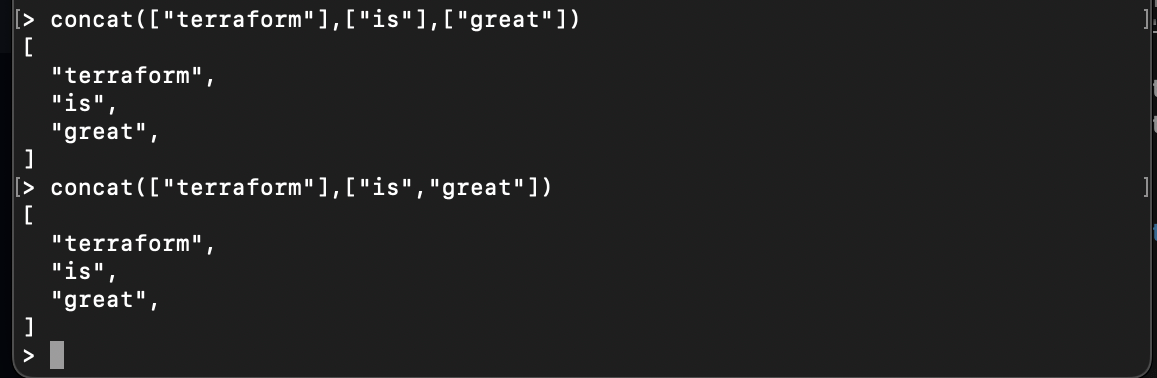
Collection functions manipulate lists and map data. For instance, a concat function takes in one or more lists and converts them into a single list:
concat(["terraform"],["is"],["great"])

concat(["terraform"],["is","great"])
The concat function combines two Amazon Web Services (AWS) regions so you can use them as availability_zones for AWS scaling instances:
locals {
  us_east= ["us-east-1a", "us-east-1b", "us-east-1c"]
  us_west = ["us-west-2a", "us-west-2b", "us-west-2c"]
  all_zones = concat(local.us_east, local.us_west)
}

resource "aws_autoscaling_group" "autoscaling_zones" {
  name = "autoscaling-group"
  availability_zones = local.all_zones
}
Here, you have two AWS regions, us-east-1 and us-west-2, and each of them has its own set of availability zones. These two regions are combined using the concat function so availability_zones can use them as a single list.
In addition, other collection functions like slice can extract specified elements from a list:
module "vpc" {
    source  = "terraform-aws-modules/vpc/aws"
    version = "3.19.0"

    name = "simpleapp-vpc"

    cidr = "10.0.0.0/16"
    azs  = slice(data.aws_availability_zones.available.names, 0, 2)

    private_subnets = ["10.0.1.0/24", "10.0.7.0/24"]
    public_subnets  = ["10.0.4.0/24", "10.0.5.0/24"]

    enable_nat_gateway   = true
    single_nat_gateway   = true
    enable_dns_hostnames = true
}
slice(data.aws_availability_zones.available.names, 0, 2) selects a subset of the available availability zones, and slice extracts the first two availability zones from this list.
Hashing Functions
When working with sensitive data in Terraform, it’s important to ensure that values are hashed and secured to prevent the original value from being revealed. This is where hashing functions can help. They take strings or file data as input and compute and generate hashes that can be used to securely store sensitive information.
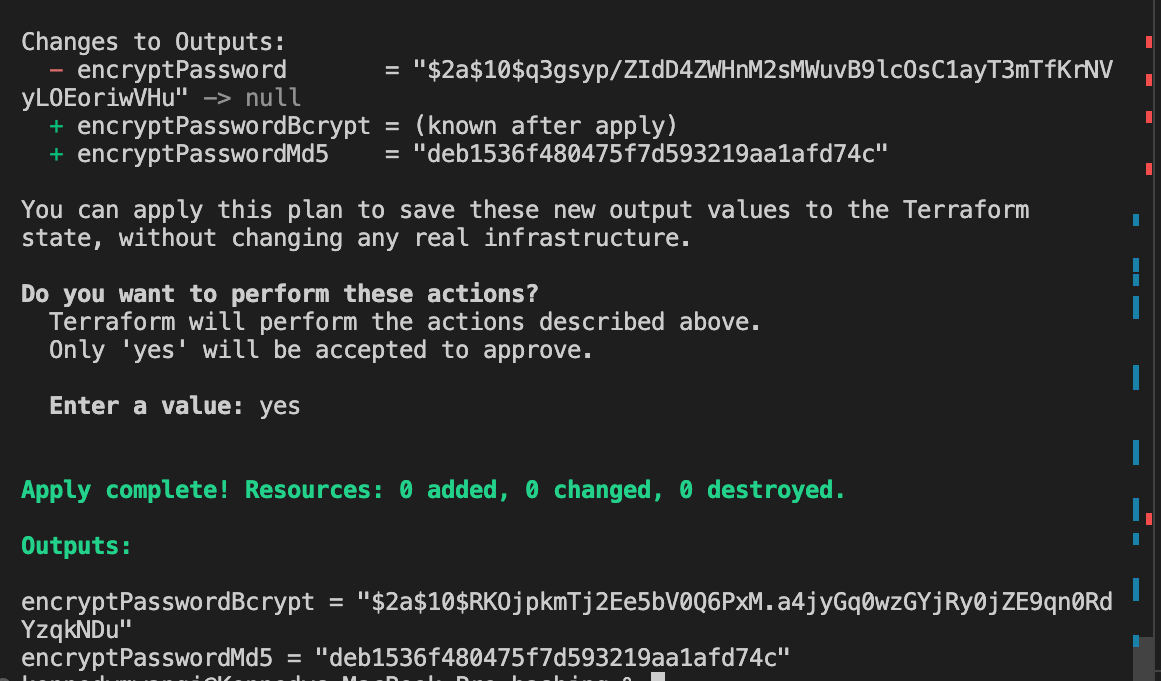
Terraform hashing functions include base64sha256, which hashes a string using sha256 and encodes it using base64. bcrypt hashes a string using the blowfish cipher, and Md5 computes the hash of the string using Md5 format:
variable "password" {
    default = "myPassword"
}

output "encryptPasswordBcrypt" {
    value = "${bcrypt(var.password)}"
}

output "encryptPasswordMd5" {
    value = "${md5(var.password)}"
}
IP Network Functions
Terraform excels at automating various tasks across multiple cloud providers, including AWS, Google Cloud Provider (GCP), and Azure. When working with cloud resources like Amazon Elastic Compute Cloud (Amazon EC2) instances and virtual private clouds (VPCs), you need to provide IP addresses and subnets as inputs. IP network functions allow you to configure these addresses and subnets while working with IP-related resources.
Terraform uses functions like cidrsubnet to calculate subnets. This function returns a subnet address that falls within a particular IP network prefix. It requires three arguments: the parent CIDR block, the prefix length for the subnet, and the subnet number within the parent CIDR block.
For instance, the following example creates a CIDR block for a subnet in a VPC with a /12 CIDR block and a subnet index of 2:
cidrsubnet("172.16.0.0/12", 4, 2)

# CIDR block: /24, subnet index: 15
cidrsubnet("10.1.2.0/24", 4, 15)

As another example, the following Terraform code generates a CIDR range for an Azure Virtual Network (VNet):
locals {
  vnet_mgt_cidr = "192.168.0.0/20"
}

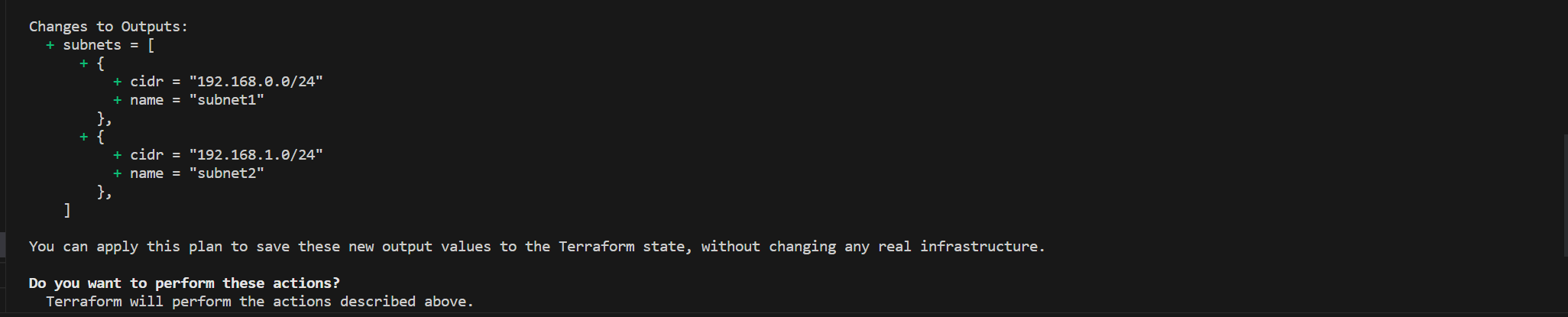
output "subnets" {
  value = [
    {
      name = "subnet1"
      cidr = cidrsubnet(local.vnet_mgt_cidr, 4, 0)
    },
    {
      name = "subnet2"
      cidr = cidrsubnet(local.vnet_mgt_cidr, 4, 1)
    },
  ]
}
This code generates CIDR range requirements for your VNet:
If you’re trying to create private and public subnets in different availability zones for your resources, generating a CIDR range would be helpful. In this case, the cidrsubnet function calculates the CIDR block for each subject in your availability zones:
resource "aws_subnet" "my-private-subnet" {
  count = length(data.aws_availability_zones.available.names)

  cidr_block = cidrsubnet(var.aws_vpc_cidr, 8, count.index)
  vpc_id     = aws_vpc.myvpc.id
  availability_zone = data.aws_availability_zones.available.names[count.index]
  map_public_ip_on_launch = "false"
  depends_on              = [aws_vpc.myvpc]

  tags =  {
    Name                         = "my-private-subnet-${data.aws_availability_zones.available.names[count.index]}"
    subnet-type                  = "private"
  }
}

resource "aws_subnet" "my-public-subnet" {
  count = length(data.aws_availability_zones.available.names)

  cidr_block = cidrsubnet(var.aws_vpc_cidr, 8, count.index + length(data.aws_availability_zones.available.names) + 1)
  vpc_id     = aws_vpc.myvpc.id
  availability_zone = data.aws_availability_zones.available.names[count.index]
  map_public_ip_on_launch = "true"
  depends_on              = [aws_vpc.myvpc]

  tags =  {
    Name                         = "my-public-subnet-${data.aws_availability_zones.available.names[count.index]}"
    subnet-type                  = "public"
  }
}
The aws_subnet resource for private subnets uses the cidrsubnet function as follows:
cidr_block = cidrsubnet(var.aws_vpc_cidr, 8, count.index)
In this code, var.aws_vpc_cidr is the CIDR block of the parent VPC. 8 is the subnet’s prefix length, and count.index is the subnet number within the VPC. The count.index creates unique CIDR blocks for each subnet.
In comparison, the aws_subnet resource for public subnets uses the same approach to ensure your public subnets have unique CIDR blocks using cidrsubnet:
cidr_block = cidrsubnet(var.aws_vpc_cidr, 8, count.index + length(data.aws_availability_zones.available.names) + 1)
Other IP network functions include cidrhost, which returns a host IP address based on the given IP prefix, and cidrnetmask, which returns a subnet mask address from an IPv4 address notation.
Type Conversion Functions
Some inputs require different data types. For instance, if you have a number value saved in a string variable and you want to use this variable for inputs that require an integer, Terraform requires that you use a type conversion function. Type conversion functions convert values between different types, such as a JSON string to a map, a list to a string, or a string to an integer.
For example, a tostring function converts the supplied value to a string:
tostring("Terraform is great")
tostring("1")

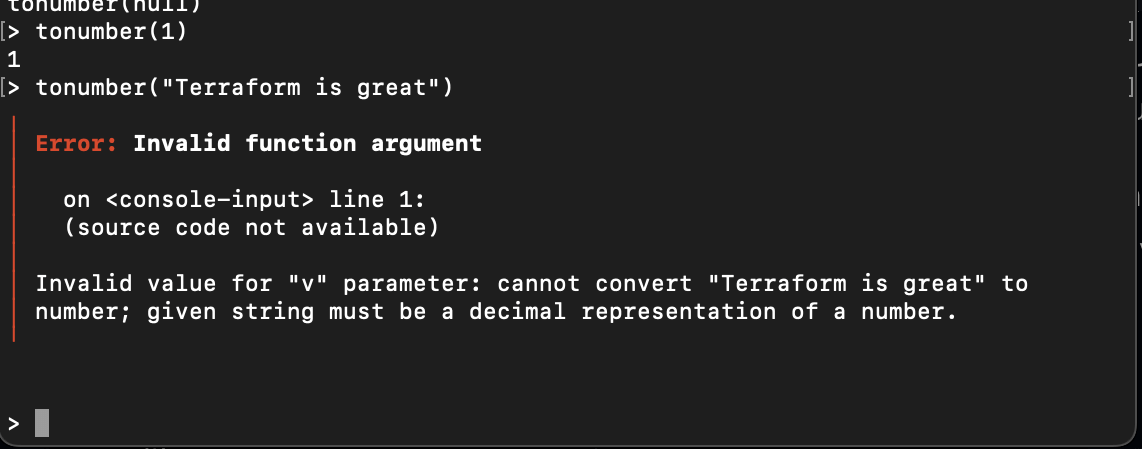
If you want to work with numbers, tonumber converts the supplied value to a number. The function returns an error if you supply a value that cannot be converted to an integer:
tonumber(1)

# non-numeric value
tonumber("Terraform is great")
Based on your data type, you can use the type function to check the type of the supplied value. In the following example, the count parameter of the aws_instance resource uses the integer value. The tonumber function ensures the values are indeed numeric:
variable "number_count" {
  type    = string
  default = "10"
}

resource "aws_instance" "app" {

  instance_type = "t2.micro"
  count         = tonumber(var.number_count)
}
File System Functions
The host running your infrastructure interacts with files and directories, such as configuration files, templates, or scripts. Terraform must be able to interact with this content in order to manage resources. The file system functions allow Terraform to read and write files on your host’s file system or remote locations.
While performing initialization that requires configuration files, you can use a fileexists function that returns true or false if a file exists on a specific path:
fileexists("terraform.txt")

Functions like file read the content of a file as follows:
file("terraform.txt")
Assuming you have a terraform.txt in your current directory, the file function reads your file as follows:

The following example uses the file function to read the contents of the config-template.yaml template file:
data "template_file" "config" {
  template = file("${path.module}/config-template.yaml")

  vars = {
    server_url = var.server_url
    api_key    = var.api_key
  }
}

resource "local_file" "config" {
  filename = "${path.module}/config.yaml"
  content  = data.template_file.config.rendered
}
Here, the data block uses the template_file data source to render the resulting configuration as a string and passes it to a local_file that writes the data to config.yaml in the local file system of your host.
Other file system functions worth considering in your Terraform code are dirname, abspath, and basename.
Date/Time Functions
Date/time functions change and format your date- and time-related operations. You can use date/time values for configuring time-based scaling, creating timestamped resources, creating resources with expiration dates, and managing backup schedules.
Terraform date/time-based functions include the following:
formatdateconverts a timestamp to a different format:
formatdate("DD MMM YYYY hh:mm ZZZ", "2023-04-30T08:50:07.885Z")

formatdate("HH:mmaa", "2023-04-30T08:50:07.885Z")

timeaddadds a duration to a timestamp and returns the new timestamp:
timeadd("2023-04-30T08:50:07.885Z","10m")

timeadd("2023-04-30T08:50:07.885Z","1h")

timecmpcompares two timestamps and returns a number representing the instances of each timestamp:
timecmp("2023-04-30T08:50:07.885Z", "2023-04-30T08:50:07.885Z")

timecmp("2023-04-30T08:50:07.885Z", "2023-04-30T09:00:07Z")

timecmp("2023-04-30T09:00:07Z", "2023-04-30T08:50:07.885Z")

Encoding Functions
Your Terraform configuration may require encoding and decoding data strategies to formats such as Base64 and JSON. Encoding functions use base64encode and base64decode functions to decode and encode binary data transmitted over a network.
For instance, base64encode applies Base64 encoding on a string:
base64encode("Terraform is Great!")

And base64decode decodes a Base64 encoded string:
base64decode("VGVycmFmb3JtIGlzIEdyZWF0IQ==")

In addition, the functions jsonencode and jsondecode convert data structures based on the JSON format. These functions are used to transfer data from a server to a client or to store it in a JSON-related database.
For instance, jsonencode encodes a given value to a string using the JSON syntax:
jsonencode({"terraform"="is great"})

jsonencode({"terraform"="is great","devops"="awesome"})

And jsondecode decodes the JSON data:
jsondecode("{\"devops\":\"awesome\",\"terraform\":\"is great\"}")

Numeric Functions
Terraform performs mathematical operations on numbers using built-in numeric functions. These functions use popular operations such as rounding off, ceiling, floor, min, and max absolute values. For example, you can use the max function and return the maximum number from a given numeric set:
max(10,50,90)
max(100,50,790)

Or you can return the minimum number from a given set with the min function:
variable "list_one" {
 default = [3,4,5,67,89]
}

variable "list_two" {
    default = [98,87,65,43]
}

output "addition" {
 value = "${sum([min(var.list_one...), max(var.list_two...)])}"
}
Other functions, such as ceil, return the nearest whole number greater than or equal to the specified value. Or the abs function returns the absolute value of a number.
Best Practices for Terraform Functions
To help ensure your Terraform functions are both practical and maintainable, it’s important to follow certain best practices, including the following:
Keep Functions Simple and Reusable
To ensure that your Terraform functions are reusable and easy to maintain, it’s important to keep them simple and focused on a single task.
One way to achieve this is to create functions using variables instead of hardcoding values so you can reuse them across different contexts within your infrastructure. By doing so, you can create a library of functions that can be easily integrated into different configurations, increasing the efficiency and flexibility of your Terraform workflow.
Follow Logical Naming Conventions
It’s important to follow logical naming conventions for functions. This involves using descriptive and consistent naming approaches that reflect the purpose of the function, thus enhancing code readability.
Test and Validate Terraform Functions
To ensure the reliability of your Terraform functions in provisioning your production infrastructure, it’s essential to test and validate them using Terraform’s built-in testing framework.
Document Your Functions
Documentation is essential for Terraform functions because it provides information about the function’s purpose, accepted parameters, and expected output. This enables other DevOps teams to understand the function’s functionality and how to utilize it effectively.
Minimize Function Usage
Functions are great; however, limit excessive use of functions and strive to only use them when necessary to strike a balance between improving code readability and avoiding unnecessary abstraction.
Only Use Terraform Built-in Functions
For consistency in your codebase, it’s recommended to use Terraform’s built-in functions instead of creating your own. This is because Terraform provides a wide range of built-in functions that can handle many everyday use cases.
Conclusion
Terraform functions are an excellent tool for simplifying infrastructure automation. They enable you to create repetitive tasks and dynamic configurations for code reusability and consistency across your infrastructure.
This guide covered just a few of the functions Terraform provides. If you want to streamline infrastructure automation workflows, start utilizing Terraform functions in infrastructure deployments today.
To learn more about the available built-in functions, check out HashiCorp’s website.
Now, with the new found knowledge, why not Confidently Automate AWS Kubernetes to EKS Cluster Deployment with Terraform or dive into learning all about Minimizing Docker Images and Docker Image Optimization Strategies like a pro.

Written By:
Joseph Chege
More Related Articles:
-

Confidently Automate AWS EKS Cluster Deployment with Terraform
AWS EKS is a fully managed Kubernetes service for AWS that simplifies the deployment, scaling, and management of containerized applications using
Jul 26, 2023
-

Guide to Deploying React Apps to Kubernetes Using Docker
The concept of Containers and Containerization helps you run the application as lightweight virtual machines. As a Web Developer, setting up local
Jul 27, 2023
-

Deploy Kubernetes CICD pipeline using GitHub Actions and EKS
In this tutorial, you will go through the steps of automating Kubernetes deployment with GitHub Actions. This guide will teach you how to create a
Jul 26, 2023
-

How to Minimize and Slim Docker Images - Docker Image Optimization Strategies
Ensuring you have light Docker images speeds up the build and deployment of your Docker containers. There are approaches you can add while building
Jul 19, 2023